react-admin is a React/TypeScript framework for building data-driven admin panels and B2B single-page apps on top of any REST or GraphQL API. It ships ready-made hooks and Material UI components for CRUD pages, forms, datagrids, auth, i18n, and more, all wired through a pluggable "Data Provider" adapter layer.
A frontend framework for building admin/back-office single-page applications on top of REST or GraphQL APIs, providing declarative CRUD components and controller hooks built on Material UI, react-hook-form, react-router, and react-query.
When to use react-admin
Choose it when you need to build internal tools, dashboards, or B2B admin interfaces quickly against an existing API, and want batteries-included components for lists, forms, filtering, auth, roles, and i18n without assembling them yourself. The Data Provider adapter model fits teams that have or can shape a REST/GraphQL backend.
When not to
It is overkill for public-facing consumer apps, marketing sites, or simple SPAs where you want full design freedom—react-admin is opinionated toward Material Design and CRUD patterns. If you don't want a Material UI dependency, prefer a headless toolkit like Refine, and if you want auto-generated admin from your database/ORM, server-driven tools like AdminJS or Directus may be faster.
Backend-agnostic via 45+ Data Provider adapters; writing a custom one is straightforward
Loosely coupled components and hooks let you replace or customize nearly any part
Strong documentation, TypeScript types, Storybook, and runnable demo apps
Mature, actively maintained, with a large community and commercial Enterprise Edition
Trade-offs
Tightly coupled to Material UI for the default UI layer, so non-MUI designs require significant effort
Opinionated CRUD/resource abstraction can fight non-standard or deeply nested data models
Learning curve for its context/hook conventions and the Data Provider contract
Heavy dependency footprint (MUI, react-hook-form, react-router, react-query) for what may be a simple app
Some advanced features (RBAC, realtime, audit log) are gated behind the paid Enterprise Edition
Maturity
Very mature and production-proven, with ~27k GitHub stars, long-term maintenance by marmelab, frequent releases, a clear master/next branching model, commercial support, and an Enterprise Edition. Widely used for internal tooling across many companies.
A frontend Framework for building single-page applications running in the browser on top of REST/GraphQL APIs, using TypeScript, React and Material Design. Open sourced and maintained by marmelab.
🧩 All The Building Blocks You Need: Provides hooks and components for authentication, routing, forms & validation, datagrid, search & filter, relationships, validation, roles & permissions, rich text editor, i18n, notifications, menus, theming, caching, etc.
🪡 High Quality: Accessibility, responsive, secure, fast, testable
💻 Great Developer Experience: Complete documentation, IDE autocompletion, type safety, storybook, demo apps with source code, modular architecture, declarative API
👑 Great User Experience: Optimistic rendering, filter-as-you-type, undo, preferences, saved queries
🛠 Complete Customization: Replace any component with your own
☂️ Opt-In Types: Develop either in TypeScript or JavaScript
// in app.js
import * as React from "react";
import { createRoot } from 'react-dom/client';
import { Admin, Resource } from 'react-admin';
import restProvider from 'ra-data-simple-rest';

import { PostList, PostEdit, PostCreate, PostIcon } from './posts';

createRoot(document.getElementById('root')!).render(
    <Admin dataProvider={restProvider('http://localhost:3000')}>
        <Resource name="posts" list={PostList} edit={PostEdit} create={PostCreate} icon={PostIcon} />
    </Admin>
);
The <Resource> component defines CRUD pages (list, edit, and create) for an API endpoint (/posts). The page components use react-admin components to fetch and render data:
React-admin uses an adapter approach, with a concept called Data Providers. Existing providers can be used as a blueprint to design your API, or you can write your own Data Provider to query an existing API. Writing a custom Data Provider is a matter of hours.
React-admin is designed as a library of loosely coupled React components and hooks exposing reusable controller logic. It is very easy to replace any part of react-admin with your own, e.g. using a custom datagrid, GraphQL instead of REST, or Bootstrap instead of Material Design.
Examples
There are several examples inside the examples folder:
simple (StackBlitz): a simple blog with posts, comments and users that we use for our e2e tests.
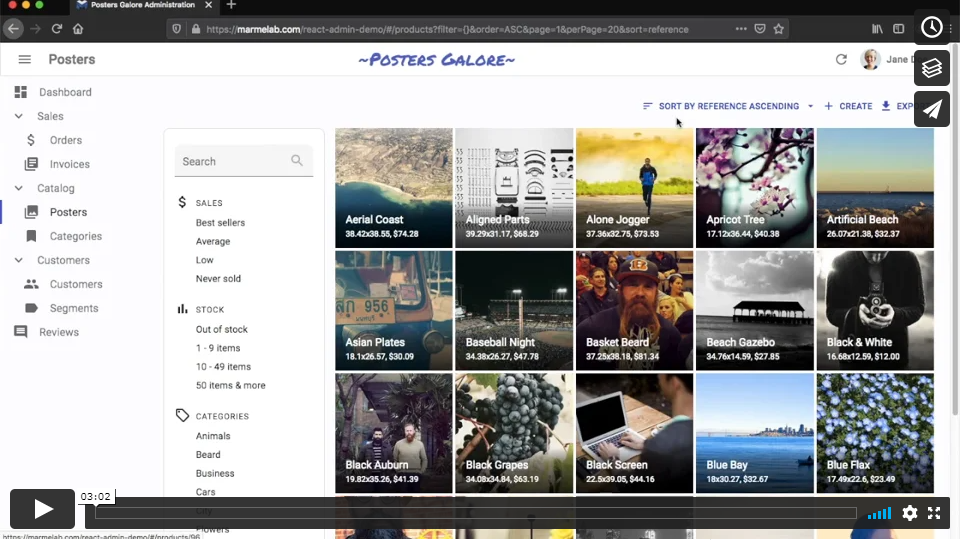
e-commerce: (demo, source) A fictional poster shop admin, serving as the official react-admin demo.
CRM: (demo, source) A customer relationship management application
helpdesk: (demo, source) A ticketing application with realtime locks and notifications
tutorial (Stackblitz): the application built while following the tutorial.
You can run those example applications by calling:
# At the react-admin project root
make install
# or
yarn install

# Run the simple application
make run-simple

# Run the tutorial application
make build
make run-tutorial

# Run the demo application
make build
make run-demo
And then browse to the URL displayed in your console.
master - commits that will be included in the next patch release
next - commits that will be included in the next major or minor release
Bugfix PRs that don't break BC should be made against master. All other PRs (new features, BC breaking bugfixes) should be made against next.
Contributing
If you want to give a hand: Thank you! There are many things you can do to help making react-admin better.
The easiest task is bug triaging. Check that new issues on GitHub follow the issue template and give a way to reproduce the issue. If not, comment on the issue to ask precisions. Then, try and reproduce the issue following the description. If you managed to reproduce the issue, add a comment to say it. Otherwise, add a comment to say that something is missing.
The second way to contribute is to answer support questions on StackOverflow. There are many beginner questions there, so even if you're not super experienced with react-admin, there is someone you can help there.
If you want to add a feature, you can open a Pull request on the next branch. We don't accept all features—we try to keep the react-admin code small and manageable. Try and see if your feature can't be built as an additional npm package. If you're in doubt, open a "Feature Request" issue to see if the core team would accept your feature before developing it.
For all Pull requests, you must follow the coding style of the existing files (based on prettier), and include unit tests and documentation. Be prepared for a thorough code review, and be patient for the merge—this is an open-source initiative.
Tip: Most of the commands used by the react-admin developers are automated in the makefile. Feel free to type make without argument to see a list of the available commands.
Setup
Clone this repository and run make install to grab the dependencies, then make build to compile the sources from TypeScript to JS.
Testing Your Changes In The Example Apps
When developing, most of the time we use the simple example to do visual check. It's the same application that we use in Stackblitz to reproduce errors (see https://stackblitz.com/github/marmelab/react-admin/tree/master/examples/simple). The source is located under examples/simple/. Call make run to launch that example on port 8080 (http://localhost:8080). This command includes a watch on the react-admin source, so any of the changes you make to the react-admin packages triggers a live update of the simple example in your browser.
However, the simple example is sometimes too limited. You can use the demo example (the source for https://marmelab.com/react-admin-demo/), which is more complete. The source is located under examples/demo/. Call make run-demo to launch the demo example with a REST dataProvider, or make run-graphql-demo to run it with a GraphQL dataProvider. Unfortunately, due to the fact that we use Create React App for this demo, these commands don't watch the changes made in the packages. You'll have to rebuild the react-admin packages after a change (using make build, or the more targeted make build-ra-core, make build-ra-ui-materialui, etc.) to see the effect in the demo app.
Both of these examples work without server—the API is simulated on the client-side.
Testing Your Changes In Your App
Using yarn link, you can have your project use a local checkout of the react-admin package instead of downloading from npm. This allows you to test react-admin changes in your app.
The following instructions are targeting yarn >= v3 in the client app.
# Go to the folder of your client app
$ cd /code/path/to/myapp/

# Use the latest version of yarn package manager
$ corepack enable && yarn set version stable

# Replace the npm-installed version with a symlink to your local version
$ yarn link /code/path/to/react-admin/packages/react-admin

# If you modified additional internal packages in the react-admin monorepo, e.g. ra-core, also make a link
$ yarn link /code/path/to/react-admin/packages/ra-core

# Build all of the react-admin package distribution
$ cd /code/path/to/react-admin/ && make build

# Return to your app and ensure all dependencies have resolved
$ cd /code/path/to/myapp/ && yarn install

# Start your app
$ yarn start
Tip: If you are still using yarn v1 as your package manager in your client app, we strongly recommend you to update as it is frozen and no longer maintained.
Automated Tests
Automated tests are also crucial in our development process. You can run all the tests (linting, unit and functional tests) by calling:
make test
Unit tests use jest, so you should be able to run a subset of tests, or run tests continuously on change, by passing options to
yarn jest
Besides, tests related to the modified files are run automatically at commit using a git pre-commit hook. This means you won't be able to commit your changes if they break the tests.
When working on the end-to-end tests, you can leverage cypress runner by starting the simple example yourself (make run-simple or yarn run-simple) and starting cypress in another terminal (make test-e2e-local or yarn test-e2e-local).
Coding Standards
If you have coding standards problems, you can fix them automatically using prettier by calling
make prettier
However, these commands are run automatically at each commit so you shouldn't have to worry about them.
Documentation
If you want to contribute to the documentation, install jekyll, then call