expanding-collection
An iOS UI library providing an animated, material-design card collection with peek/pop expansion and smooth push/pop transitions to a detail view. Built on UICollectionView with subclassable controllers and cells.
Embed badge

[](https://opensources.dev/resource/expanding-collection)MITPermissive — free to use in commercial and proprietary software, with attribution.View license →
Production readiness
3/5- Actively maintainedNo commits in over a year
- No known vulnerabilitiesNot yet scanned
- Clear, usable licenseMIT (permissive)
- Proven adoptionWidely used
- Has documentationDocumentation indexed
Our analysis
A Swift/iOS component from Ramotion that delivers an animated card-based collection view where cards expand (peek/pop) and transition into a detail table view controller. You subclass ExpandingViewController and BasePageCollectionCell to wire it up.
When to use expanding-collection
Use it when you want a polished, ready-made expanding card carousel UI for an iOS app and prefer a drop-in component over hand-rolling collection view animations. Good for showcase/discovery screens with image-heavy cards.
When not to
Avoid for non-iOS or SwiftUI-first codebases, since it's UIKit/xib-based and predates SwiftUI. Not ideal if you need a generic, highly customizable layout engine or have complex dynamic content that fights its fixed cellSize/header constraints.
Strengths
- Visually distinctive, production-quality animation out of the box
- Distributed via CocoaPods, Carthage, or manual source drop-in
- MIT licensed and has an Android counterpart for cross-platform design parity
- Clear subclassing model integrated with standard UICollectionView APIs
Trade-offs
- UIKit/xib-based with no SwiftUI support; feels dated for modern projects
- Rigid setup with manual IBOutlet/constraint wiring (frontConstraintY, tag=101 conventions) that is error-prone
- Tied to fixed itemSize and header heights, limiting layout flexibility
- Largely a design-showcase repo with light long-term maintenance and a backlink/credit request
Maturity
Mature and widely starred (5k+) as one of Ramotion's flagship UI demos, but it is essentially a finished component with infrequent updates and aging UIKit/Swift API references. Stable for what it does, but not actively evolving toward newer iOS paradigms.






Requirements
iOS 9.0+
Xcode 9.0+
Installation
Just add the Source folder to your project.
or use CocoaPods with Podfile:
pod 'expanding-collection'
or Carthage users can simply add to their Cartfile:
github "Ramotion/expanding-collection"
Usage
import expanding_collection
Create CollectionViewCell
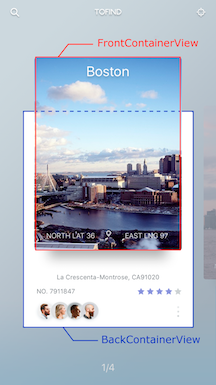
Create UICollectionViewCell inherit from
BasePageCollectionCell(recommend create cell with xib file)Adding FrontView
add a view to YOURCELL.xib and connect it to
@IBOutlet weak var frontContainerView: UIView!add width, height, centerX and centerY constraints (width and height constranints must equal cellSize)
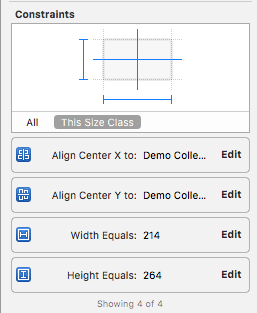
connect centerY constraint to
@IBOutlet weak var frontConstraintY: NSLayoutConstraint!add any desired uiviews to frontView
Adding BackView
repeat step 2 (connect outlets to
@IBOutlet weak var backContainerView: UIView!,@IBOutlet weak var backConstraintY: NSLayoutConstraint!)
Cell example DemoCell
If set tag = 101 for any FrontView.subviews this view will be hidden during the transition animation
Create CollectionViewController
Create a UIViewController inheriting from
ExpandingViewControllerRegister Cell and set Cell size:
override func viewDidLoad() {
    itemSize = CGSize(width: 214, height: 460) //IMPORTANT!!! Height of open state cell
    super.viewDidLoad()

    // register cell
    let nib = UINib(nibName: "NibName", bundle: nil)
    collectionView?.registerNib(nib, forCellWithReuseIdentifier: "CellIdentifier")
}
Add UICollectionViewDataSource methods
extension YourViewController {

  override func collectionView(collectionView: UICollectionView, numberOfItemsInSection section: Int) -> Int {
    return items.count
  }

  override func collectionView(collectionView: UICollectionView, cellForItemAtIndexPath indexPath: NSIndexPath) -> UICollectionViewCell {
    let cell = collectionView.dequeueReusableCellWithReuseIdentifier("CellIdentifier"), forIndexPath: indexPath)
    // configure cell
    return cell
  }
}
Open Cell animation
override func viewDidLoad() {
    itemSize = CGSize(width: 214, height: 264)
    super.viewDidLoad()

    // register cell
    let nib = UINib(nibName: "CellIdentifier", bundle: nil)
    collectionView?.registerNib(nib, forCellWithReuseIdentifier: String(DemoCollectionViewCell))
}
func collectionView(collectionView: UICollectionView, didSelectItemAtIndexPath indexPath: NSIndexPath) {
    cell.cellIsOpen(!cell.isOpened)
}
if you use this delegates method:
func collectionView(collectionView: UICollectionView, willDisplayCell cell: UICollectionViewCell, forItemAtIndexPath indexPath: NSIndexPath)

func scrollViewDidEndDecelerating(scrollView: UIScrollView)
must call super method:
func collectionView(collectionView: UICollectionView, willDisplayCell cell: UICollectionViewCell, forItemAtIndexPath indexPath: NSIndexPath) {
  super.collectionView(collectionView: collectionView, willDisplayCell cell: cell, forItemAtIndexPath indexPath: indexPath)
  // code
}

func scrollViewDidEndDecelerating(scrollView: UIScrollView) {
  super.scrollViewDidEndDecelerating(scrollView: scrollView)
  // code
}
Transition animation
Create a UITableViewController inheriting from
ExpandingTableViewControllerSet header height default 236
override init(nibName nibNameOrNil: String?, bundle nibBundleOrNil: Bundle?) {
    super.init(nibName: nibNameOrNil, bundle: nibBundleOrNil)
    headerHeight = ***
}
OR
required init?(coder aDecoder: NSCoder) {
    super.init(coder: aDecoder)
    headerHeight = ***
}
Call the push method in YourViewController to YourTableViewController
  if cell.isOpened == true {
    let vc: YourTableViewController = // ... create view controller
    pushToViewController(vc)
  }
For back transition use
popTransitionAnimation()
🗂 Check this library on other language:
📄 License
Expanding Collection is released under the MIT license. See LICENSE for details.
This library is a part of a selection of our best UI open-source projects.
If you use the open-source library in your project, please make sure to credit and backlink to www.ramotion.com
📱 Get the Showroom App for iOS to give it a try
Try this UI component and more like this in our iOS app. Contact us if interested.
On this page
- Requirements
- Installation
- Usage
- Create CollectionViewCell
- If set tag = 101 for any FrontView.subviews this view will be hidden during the transition animation
- Create CollectionViewController
- if you use this delegates method:
- must call super method:
- Transition animation
- 🗂 Check this library on other language:
- 📄 License
- 📱 Get the Showroom App for iOS to give it a try